Acedly AI vs Verve AI: Which Interview Copilot Fits You? (2026)
Compare live-answer speed, Acedly's dedicated phone interview mode, Verve's iPhone companion, mock practice, session limits, languages, and monthly value.
Editorial Team
Acedly comparison guide
Acedly × Verve AI
Product workflow · pricing · trade-offs
Review at a glance
Acedly × Verve AI
This is an Acedly-authored comparison based on public product materials and the pictured interface where available. It is not a controlled head-to-head benchmark.
- What the product is for
- interview preparation and live assistance
- Best fit
- interview preparation and live assistance
Reassessing the current product
Verve's current site describes résumé and job-description context, automatic live question detection, coding and assessment help, mock interviews, and a post-interview report. Acedly cannot claim those categories as exclusive. The decision is how well each handles your role, language, phone or coding format, and review across rounds. Verve publishes its own latency claim; do not compare that number directly with a different metric from Acedly. Run the same practice question on your device and note when the first useful answer appears.
Discussions on Reddit and other forums
An r/interviews thread mentions Verve alongside other job-search tools. Some replies praise help with structuring answers and practice feedback, while a later reply criticizes the service. The discussion began in July 2024, so it is better used to identify questions than to describe the current app: does today's version improve the structure of your own answer, and is its feedback specific enough to act on?
Preparation to interview report
Verve's public workflow starts with a résumé and job description, then detects questions during a live interview, supports coding and assessments, and prepares a report afterward. The published review valued that customization. Since Acedly covers several of these stages too, compare how one actual job's context carries across a mock, a live-style question, and the report rather than counting feature names.
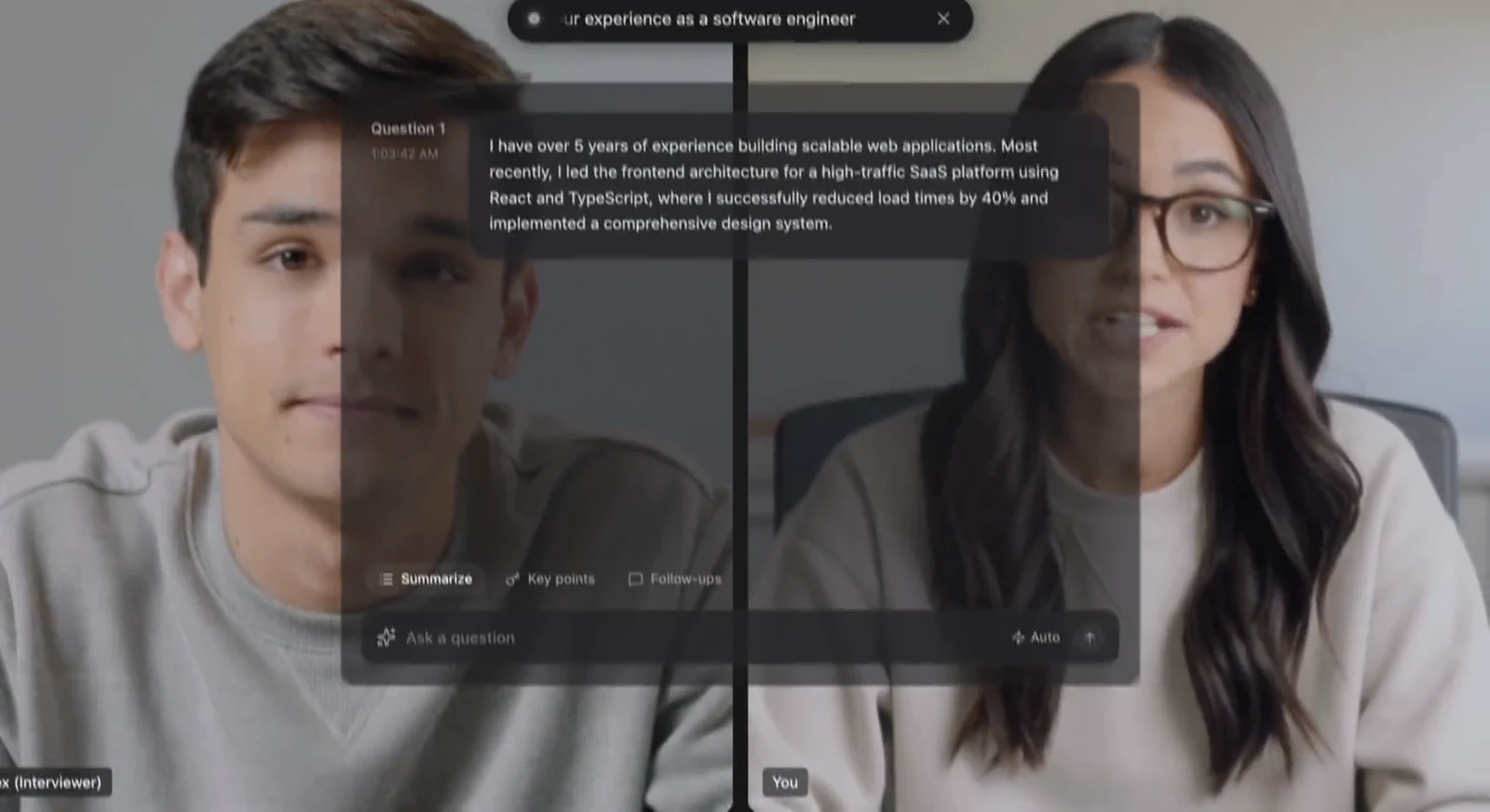
Verve AI — Suggested answers during a video interview
Official demo frame · vervecopilot.com · Retrieved
Illustrative material
Lag and device mode
The reviewer reported lag and described a browser-extension visibility risk. Verve now advertises a desktop app along with browser and mobile access, so an extension-only verdict is outdated. Test the desktop mode you would buy, and note when the first usable suggestion appears during a spoken technical follow-up. Different vendor latency claims may measure different start and end events.
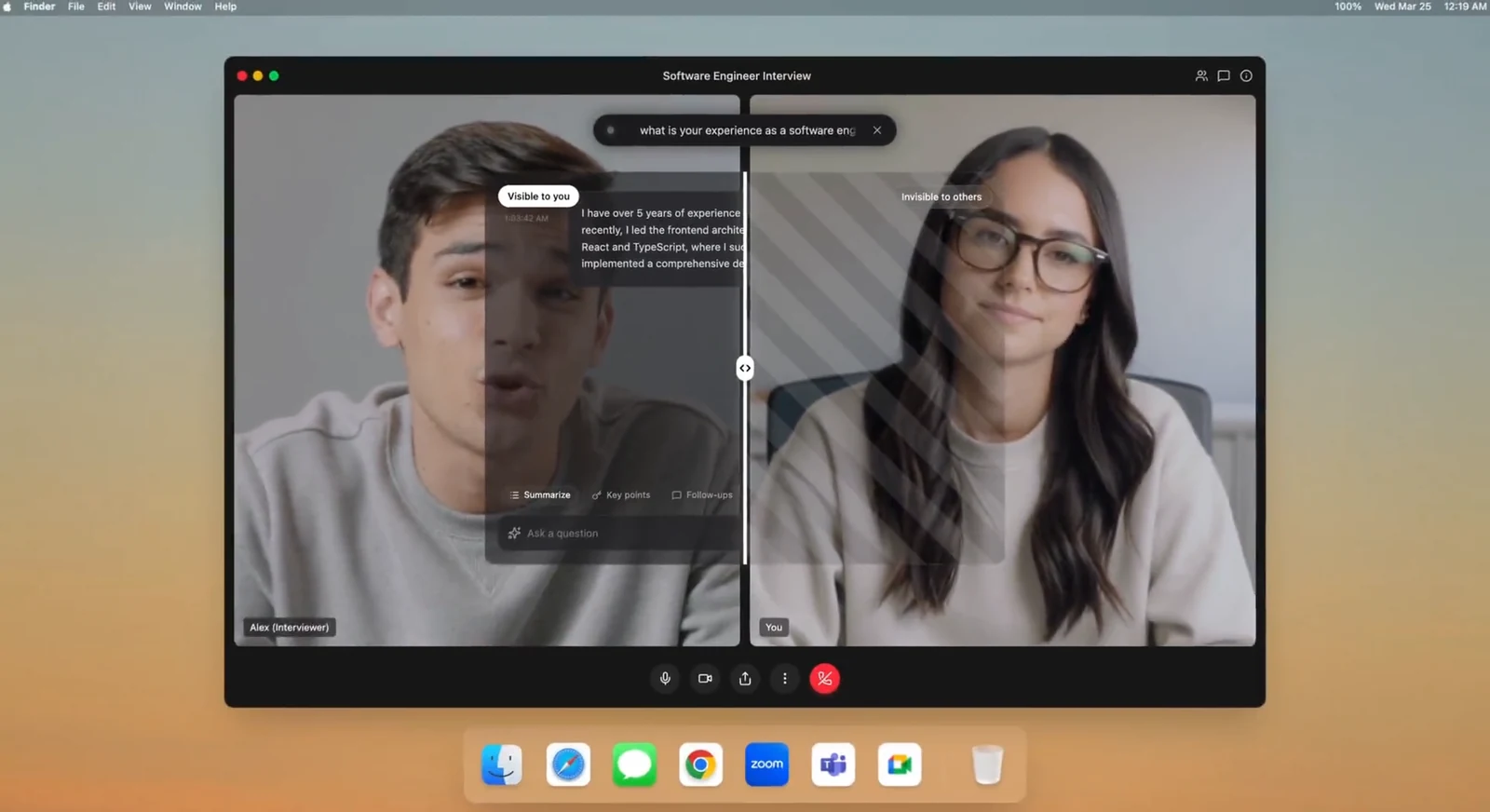
Verve AI — Vendor illustration of screen-sharing visibility
Official demo frame · vervecopilot.com · Retrieved
Illustrative material
Who benefits from the broader toolkit
Verve also advertises mock interviews, language options, and phone support. A bilingual question plus a screen-based coding task can reveal how well those features work together. Inspect the post-interview report for a concrete next practice step. Compare price and access at current checkout, then choose between Verve and Acedly based on the workflow that improves your next round.
Questions to check in your own trial
Role-specific coaching
The reviewer appreciated tailoring from résumé and job-description context. Verify that a suggestion cites the right achievement rather than merely repeating the job title. Run two roles with different success criteria and ask the same opening question. The response should change its examples, technical level, and emphasis. Acedly must pass the same check for its context claims to matter.
Reported lag versus current desktop app
The older test reported delays and extension visibility. Verve now offers a desktop route, which may change both problems. Do a current test using a spoken question and a screen coding task, noting when the first useful guidance appears and whether clicking the interface interrupts the call. Old extension results cannot be presented as the desktop app's measured performance.
Interview report usefulness
A report has value when it changes the next rehearsal. After one mock, pick a weakness noted by the report and repeat a similar question. See whether the second attempt gets more specific feedback and whether the history remains accessible. This makes a stronger purchase comparison than a list of report fields or a vendor latency statistic.
Evaluate the real interview workflow
Verve's public workflow uses résumé and job-description material before the call, detects live questions, helps with coding and assessments, and produces a report afterward. A published review appreciated customization but reported lag and treated browser-extension visibility as a major weakness. Its current site now offers a desktop app as well as browser and mobile access. That change makes the old extension-only conclusion unsuitable as a present-tense claim; test the desktop version you would actually use.
The final purchase check
The vendor also advertises mock interviews, language support, and a free entry point. Compare a bilingual question and one screen-based coding task, then inspect the report for actionable feedback. Verve's published latency number and Acedly's published number may measure different events, so do not rank them without a common stopwatch definition. The buying choice is which tool helps you rehearse and improve between rounds, not a single marketing metric.
Verve AI: What stands out
- Live interview suggestions
- Job search and career tools
- Phone interview workflow
Trade-offs to check
- 01Confirm what the current checkout includes
- 02Check per-session limits before a long interview
- 03Test audio, screen capture, and screen sharing on your exact setup
Pricing and plan access
Plan inclusions and promotional prices can change. Check the current checkout for the feature and term you need.
A ten-minute test before deciding
Run a permitted phone-screen rehearsal and compare how each product handles audio-only context.
Which should you choose?
Choose Acedly when
you want résumé and job-description context, role-specific practice, live assistance, and post-interview review in one workflow. Try your actual meeting and device before relying on any screen-sharing claim.
Choose the other product when
its primary use and plan structure match your interview schedule better. The checklist above is more useful than any universal winner claim.
Common question
Is Acedly automatically better?
No. The right choice depends on your interview format, the features included in the plan you would buy, and a practice test on your own device. Acedly is strongest when you want preparation, live help, and review connected across rounds.