Acedly AI vs Parakeet AI: Why Acedly Is the Better Copilot (2026)
See why Acedly AI is the stronger Parakeet AI alternative for active job seekers: measured latency, dedicated phone interviews, 76+ mock scenarios, multi-model routing, and scored review in one product.
Editorial Team
Acedly comparison guide
Acedly × Parakeet AI
Product workflow · pricing · trade-offs
A closer look at Parakeet AI
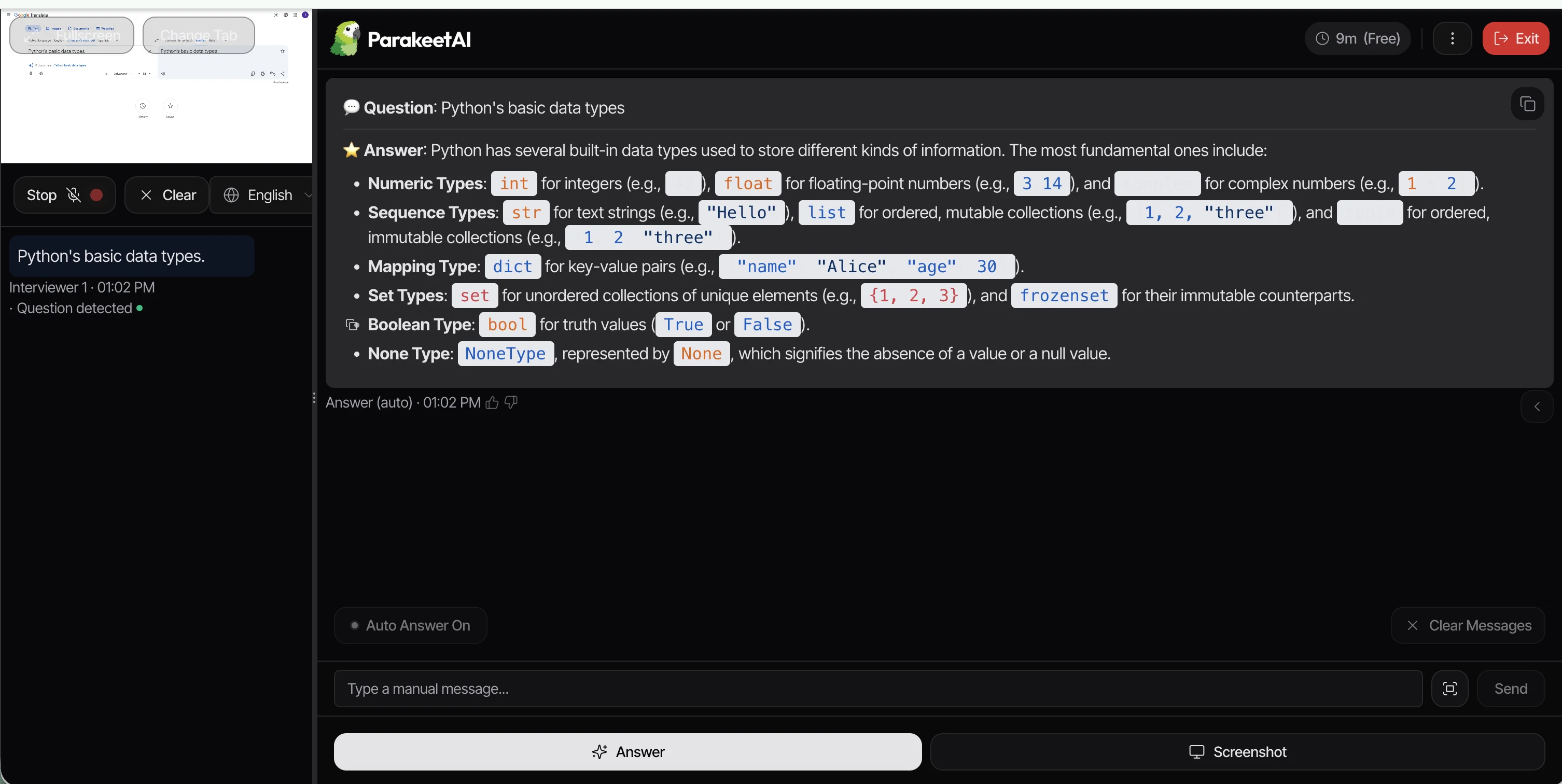
Review at a glance
Acedly × Parakeet AI
This is an Acedly-authored comparison based on public product materials and the pictured interface where available. It is not a controlled head-to-head benchmark.
- What the product is for
- live interview assistance
- Best fit
- occasional interviews and flexible credit use
Reassessing the current product
The Parakeet reviews that prompted this comparison describe manual answer triggers, narrow model choice, and rigid sessions. Its current product page now advertises Auto Answer, a model selector with Gemini, GPT, and Claude options, plus both credit packs and unlimited plans. Those older criticisms should not be repeated as current facts. The useful decision is narrower: check how well the live answer uses your résumé and uploaded documents, whether the chosen model handles your interview language, and whether credits or a subscription fit your schedule. Parakeet also lists phone calls through Google Voice, so Acedly's phone mode is a workflow difference to test rather than an exclusive capability.
Discussions on Reddit and other forums
In r/parakeetAi, a poster asked how to use Parakeet for a phone screen when speakerphone capture mixed their own answer with the interviewer's question. Another thread discusses choosing credits versus a subscription. These are useful questions for a trial: can the tool distinguish speakers on your setup, and does the plan cover your expected call length? Check the current pricing page because older posts describe different offers.
What Parakeet AI does
Parakeet is a live interview assistant: it listens to a conversation, transcribes questions, and presents suggested answers. Candidates can add a résumé and other materials before a call, then use a real or mock session. The original review valued this straightforward entry point and its coverage of common behavioral questions. Its discussion of Zoom, Teams, Meet, and coding sites is about the situations a candidate should rehearse, not a guarantee that every sharing mode will hide the interface.
Starting a session and handling follow-ups
The published account describes opening the web dashboard, connecting the desktop app, choosing a session, and then pressing a control when an answer is needed. It says that switching windows and moving the pointer interrupted the conversation, especially while showing code. Parakeet now advertises Auto Answer, so the precise manual sequence has changed. A useful present-day trial asks a behavioral question, then changes the requirements orally while sharing an editor; note whether the second suggestion understands both the screen and the spoken update.
Technical rounds, visibility, and model choice
The reviews worried about manual screenshots for coding, visible mouse movement, delayed suggestions, and a small model menu. These are reported experiences and older product descriptions, not controlled tests of the current release. The official product now lists Gemini, GPT, and Claude families. Model variety alone does not establish answer quality: check whether a suggested solution explains constraints, handles a counterexample, and can be spoken naturally. Test tab, window, and full-screen sharing on the exact meeting software you will use.
Credits, session length, and who it suits
The earlier review favored Parakeet's pay-as-you-go flexibility but found session limits stressful when a call ran long. Current pricing offers non-expiring credits and unlimited weekly, monthly, and annual options, plus a free ten-minute session. For one or two short interviews, credits may be economical; for repeated practice, compare an unlimited term and any per-session limits. Acedly is worth comparing when the same job background needs to flow from mock interviews into live assistance and later review.
Questions to check in your own trial
Answer trigger and timing
The earlier reviews describe a click before each answer and a pause while a suggestion was generated. That matters when a candidate must continue speaking instead of staring at an overlay. Auto Answer is now advertised, but a buyer should still check where a question is segmented, when text starts appearing, and whether a follow-up is treated as a continuation rather than a new topic.
Cursor and screen-sharing behavior
The reported problem was not simply whether the main window was visible. Moving the pointer to controls, switching windows, and interacting with a coding editor could alter what an interviewer sees. This depends on operating system and share mode. Test the precise Zoom, Meet, or Teams workflow you plan to use, including any visible tooltip or resize handle, before relying on privacy marketing.
Coding assistance
The review found manual screenshots workable for simple prompts but distracting when a coding task changed in real time. A stronger check is to capture a problem, explain an edge case aloud, then change a constraint without taking a new screenshot. Inspect whether the assistant updates its approach, tests the code, and explains complexity in words a candidate can defend.
Privacy and data handling
The source questioned how interview recordings and uploaded materials are stored. That is a transparency question, not evidence of misuse. Before adding a real résumé, inspect the current privacy policy, deletion controls, and whether recordings or transcripts can be removed. Apply the same check to Acedly; a product comparison should not imply one side's data practices are proven safe without documentation.
Which pricing model wins
Non-expiring credits reduce commitment when there is only one interview, but usage becomes harder to predict across multiple rounds. Unlimited plans solve a different problem: repeated mocks and long calls. Compare a realistic schedule that includes preparation, recruiter screen, technical rounds, and follow-ups rather than comparing one entry price. Acedly's advantage should be judged across that whole schedule.
Evaluate the real interview workflow
A typical Parakeet setup starts with a session, a résumé or documents, and instructions for the role. Its current interface offers real and mock sessions, automatic answer suggestions, transcript and notes, plus desktop, browser, and mobile-web access. The older published review described moving between the web dashboard and desktop app as extra setup, and said manually pressing Answer during a call was distracting. The current Auto Answer option changes that workflow, so a current trial should include both automatic and manual modes.
The final purchase check
For coding, compare what each product sees from the screen and what it hears from the interviewer. Do not rely on a screenshot of one successful answer: ask a follow-up that changes the constraints. Parakeet's free ten-minute session and non-expiring credits suit occasional use; weekly, monthly, and yearly unlimited plans suit heavier use. Acedly becomes more compelling when the same résumé and job description should carry through repeated practice, live guidance, and post-interview review.
Parakeet AI: What stands out
- Credits and subscription options
- Desktop, browser, and mobile access
- Automatic interview notes
Trade-offs to check
- 01Test audio, screen capture, and screen sharing on your exact setup
- 02Check whether suggestions are concise and grounded in your own experience
- 03Confirm what the current checkout includes
Pricing and plan access
Credits plus weekly, monthly, and yearly access are advertised; compare the current checkout with the number of interviews you expect.
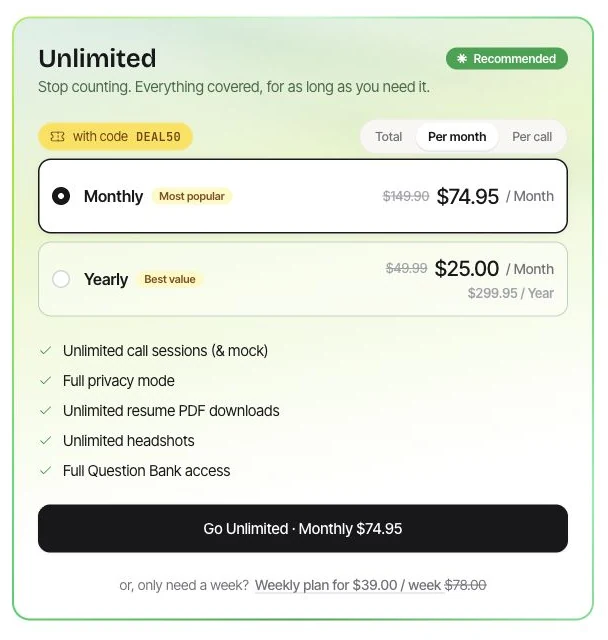
Parakeet AI — Unlimited plans with code DEAL50
Official pricing page screenshot · parakeet-ai.com · Captured
Prices and offers may change. Confirm the billing term and checkout price.
A ten-minute test before deciding
Ask five spoken questions in a permitted practice call. Compare transcription accuracy, useful-answer timing, and whether you have to intervene manually.
Which should you choose?
Choose Acedly when
you want résumé and job-description context, role-specific practice, live assistance, and post-interview review in one workflow. Try your actual meeting and device before relying on any screen-sharing claim.
Choose the other product when
its primary use and plan structure match your interview schedule better. The checklist above is more useful than any universal winner claim.
Common question
Is Acedly automatically better?
No. The right choice depends on your interview format, the features included in the plan you would buy, and a practice test on your own device. Acedly is strongest when you want preparation, live help, and review connected across rounds.